WhatsApp & Booking
WhatsApp Appointment Booking for Salons: Keep the Clients, Lose the Chaos
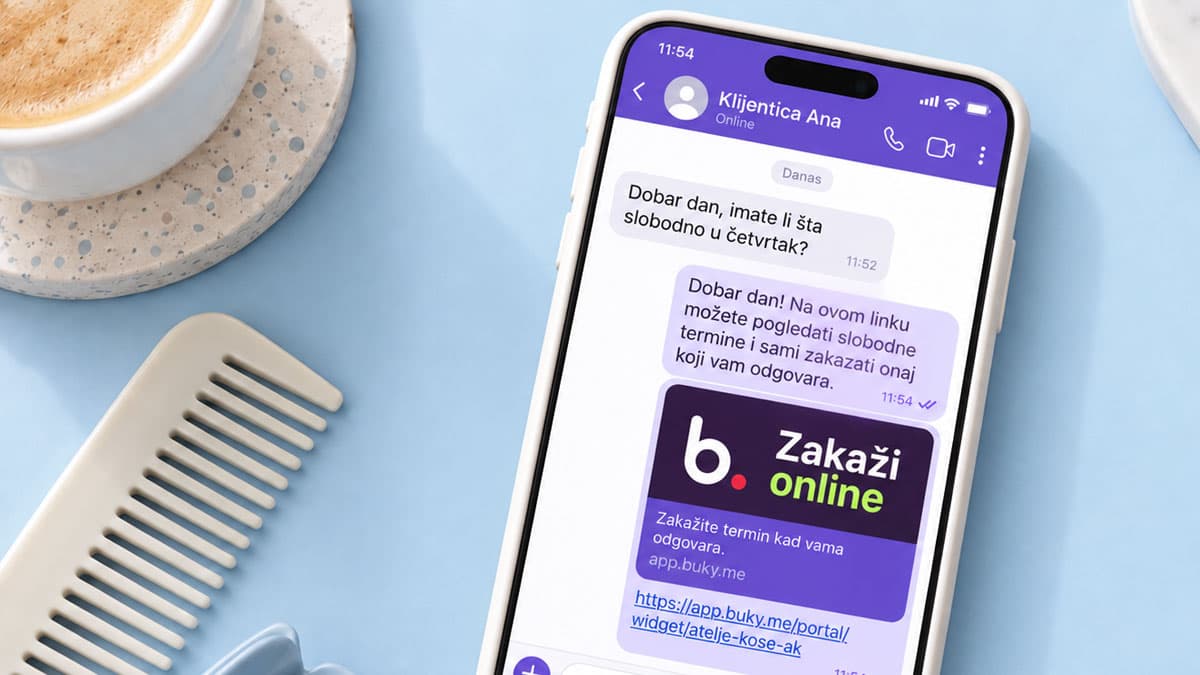
A client isn’t going to open your website to book a blow-dry. She’s going to text you on WhatsApp, because that’s where she texts her sister, her kid’s teacher, and the group chat from work. That isn’t changing just because you’d like a tidier schedule.
So this isn’t a “stop using WhatsApp” article. It’s the opposite: WhatsApp appointment booking for salons can work well — as long as WhatsApp stays the place for conversation and your calendar lives somewhere else. The app was never the problem. The problem is that your schedule is spread across 40 open chats, and the only person who can see all of it is you. We’ve covered why booking shouldn’t depend on calls and messages before; this is the practical part.
Key insight: The goal isn’t less WhatsApp. It’s fewer messages per appointment. When a client picks a free slot from a link, an eight-message conversation becomes one.
Set up WhatsApp Business for salon bookings properly
Most salons run everything from the owner’s personal number. It works, but it looks like texting a friend, not a business. A business profile takes half an hour — here’s what to fill in, whatever the buttons are called in the current version of the app:
- Business name and description. Same name as on Instagram and Google, so people recognize you.
- Hours and address. A client texting at 11 PM sees you open at 9 and doesn’t expect an answer at midnight.
- Your booking link, front and center. In the profile description and in the first message a client receives.
- Greeting and away messages. Turn on automatic replies: “Thanks for reaching out! You can see all open slots and book here: [link]. We answer messages weekdays 9–7.” The client gets a solution instantly; you typed nothing.
- Quick replies. Price list, location with a map pin, parking, how to prep for a treatment. Save them as quick replies in the app or in your phone’s notes, and paste instead of retyping.
- A pinned message. In chats with regulars, pin the message with your booking link so it’s at the top next time they open the conversation.
WhatsApp appointment booking for salons without the back-and-forth: a link instead of a conversation
One rule: every question about availability gets one message and a link, and the client picks a free slot themselves. You stop being the calendar.
Before
A typical exchange for a $45 haircut:
- Client: “Hi! Do you have anything Thursday?”
- You (two hours later, between two clients): “I have 11 and 4.”
- Client: “11 doesn’t work and 4 is late. Friday?”
- You: “Friday’s full. Saturday at 10?”
- Client: “Maybe, let me check with my husband.”
- Client (next day): “Saturday at 10 works!”
- You: “Saturday 10 just went, I have 12.”
- Client: “Ok, 12.”
Eight messages, two days, one $45 appointment — and a real chance you promised that same 12 o’clock to someone else in between.
After
- Client: “Hi! Do you have anything Thursday?”
- You: “Hi! You can see every open slot here and grab whichever works: [link]. You’ll get a confirmation as soon as you book.”
- The client picks Saturday at 12 herself, and it lands in your calendar.
You sent one sentence, and it was pasted.
| Before | After | |
|---|---|---|
| Messages per booking | 8 | 1 |
| Time to confirmation | 1–2 days | a few minutes |
| Who checks availability | you, from memory | the system, from the calendar |
| Double-booking risk | high | none |
Two habits that make booking through WhatsApp stick
- The link is always the first reply. Not “I have 11 and 4,” but the link — even when you know there’s room.
- The link is everywhere. Profile description, away message, pinned message, bottom of the price list — and your Instagram bio, so booking through Instagram and through WhatsApp become one process with two doors.
Rules for the messages that still come in
Not everyone will tap. The woman who’s been coming in for color every six weeks for 12 years will keep texting “same as always, Thursday?” — and that’s fine. What matters is that those bookings don’t break the system.
- Fixed reply windows. Two or three times a day: before you open, at lunch, after the last client. Say so in the away message; outside those windows, the phone stays in the drawer.
- One template for everyone. The same reply with the link, no exceptions — unless a client explicitly says they don’t want a link.
- Every appointment booked by text or phone goes into the same calendar immediately. Not later, not “when I finish this client.” Right now, into the same calendar where online bookings land. Two calendars are the fastest route to a double booking.
- Never confirm from memory. “Sure, Thursday at 2” is a promise. Look at the calendar first, then confirm. An impatient client will wait a minute; they won’t wait at the door while you explain the slot is taken.
What a WhatsApp group or broadcast list is for (and what it isn’t)
A group, community, or broadcast list is a great tool for one direction: you announce, clients read.
Good for:
- A slot that just opened. “Tomorrow at 3 PM just freed up for a gel manicure — first to book through the link gets it.” The link decides who’s first, not you.
- Schedule changes. Holidays, vacation, a stylist out sick, a new team member.
Not for:
- Taking bookings. Twenty “me!” replies in a group is worse chaos than twenty private messages. Every “me!” gets pointed at the link.
- Sorting out details. Questions about someone’s specific appointment belong in a private chat, not the group.
Short version: the group announces, the link books.
How Buky works alongside WhatsApp
Buky doesn’t replace WhatsApp — it gives it a calendar. In practice:
- One booking link. Send it in a WhatsApp message, put it in your away message, pin it in chats, and print it as a QR code next to the register.
- Clients only see slots that are actually free. You set working hours and breaks once, every service has its own duration and price, and nothing can be booked outside them.
- Everything lands in one calendar. What clients book themselves and what you enter after a text or a call. Each stylist sees their own appointments; you see the whole schedule on your phone.
- Confirmations and reminders run themselves. Clients get an automatic confirmation, then an SMS or email reminder before the appointment. Salons using reminders see up to 50% fewer no-shows.
To be clear: Buky doesn’t send messages through WhatsApp and doesn’t read your chats. WhatsApp stays your channel for conversation; Buky keeps the schedule.
FAQ
Can clients still book by just messaging me?
Yes. The link is for people who want to book right now; messages still come in. The only difference is that the appointment goes into the same calendar immediately instead of staying in the chat.
What about an older client who doesn’t want to tap links?
Nothing changes for her. You agree on a time by text or phone like always, enter it manually, and she still gets an SMS reminder the day before — which, honestly, is usually the part she appreciates most.
Do I need WhatsApp Business, or is a regular account fine?
A booking link works from a regular account too. Business is worth it for the hours, description, and automatic replies — that’s what gets the link to a client even when you can’t answer.
Conclusion: WhatsApp for conversation, a calendar for appointments
Your clients aren’t leaving WhatsApp, and they don’t need to. Set up a business profile, put your booking link everywhere a client looks, answer with one message instead of eight, and keep every appointment — online or from a text — in the same calendar. WhatsApp keeps bringing clients in; it just stops running your schedule.
Try Buky free for 14 days and send your booking link on WhatsApp today – no credit card, no commitment.